Cooling Designer
Desktop software that sizes the liquid cooling of an AI data hall and issues the design package.
You enter the site and the rack list. You get the sized plant, a full-year energy model, the rule checks, the report, the drawings and the BIM model.
- 16 design steps in one model
- 8,760 hours of the site's weather
- Windows and macOS, works offline
See it work
Hall A, Frankfurt, from a new project to the issued report: the 3D build of the hall, then all 16 steps. 70 seconds.
What you put in, what you get out
One project goes from an empty site to an issued revision. You do not need a spreadsheet or a second tool.
You put in
- The site: a point on the map or its coordinates.
- The rack list: from the rack library, or a CSV file with the columns rack and kw.
- The build phases: the date of each phase and the racks in use.
- The cooling architecture: direct-to-chip, rear-door, immersion or air.
- The equipment: from the library, or your vendor's datasheet with its pump curve.
- Your project limits: pipe velocity, pressure drop per metre, design margin, noise limit at the boundary, slab rating.
You get out
- The sized plant: CDUs, pumps, pipe sizes, dry coolers, chillers, fan walls, heat exchangers and the heat pump.
- The year: annual and monthly PUE, WUE, water by source, energy, running cost and carbon.
- The checks: each rule of the site with pass, warning or fail, and the source of the rule.
- The files: report, equipment schedule, calculation log, 6 drawing sheets, IFC model, BMS points list, CFD layout, commissioning test sheets and a 3D video.
Hall A, Frankfurt, the sample project
- IT load
- 10.86 MW
- Racks
- 100
- To liquid
- 9.50 MW
- CDUs
- 7 + 1 × 1.5 MW
- Annual PUE
- 1.12
- Checks
- 16 pass · 0 fail
The engineering process, in 16 steps
A project goes through three phases. The app keeps the steps in this order, and each step uses the results of the steps before it.
- EngineerMakes the design.
- ReviewerComments, then approves with a signature.
- ClientReads the issued revision.
- AdminSets the people, the roles and the defaults.
Site and climate
Pick the place. The app loads a typical weather year and 25 years of hourly data for the design conditions.
IT load
Rack groups from the rack library or a CSV list, with build phases. The heat splits into liquid and air.
Architecture
Direct-to-chip, immersion, rear-door or air. The schematic follows the choice.
Liquid loop
The rack loop and facility water, with CoolProp fluid data at the loop's mean temperature.
Heat rejection and energy
Dry coolers, adiabatic hours and trim chillers, run for all 8,760 hours of the year.
Heat reuse and carbon
A heat pump to district heating, the reuse factor, CUE and the carbon of the year.
Redundancy
Each failure case: one or two CDUs, a pump, two dry coolers, a heat exchanger, a chiller, and a power loss with its ride-through.
Leaks, fluid and controls
Leak zones with their sensors and the action of each, the fluid volume and the fluid quality limits.
Floor plan and 3D model
The hall drawn from the design: rows, CDUs, pipes and the yard, with a build tour in 3D and a video.
Compare options
Copies of the design side by side, each run for the full year: energy, water, heat reuse and cost.
Checks
Every rule for the site, global, EU and national, run again after each change.
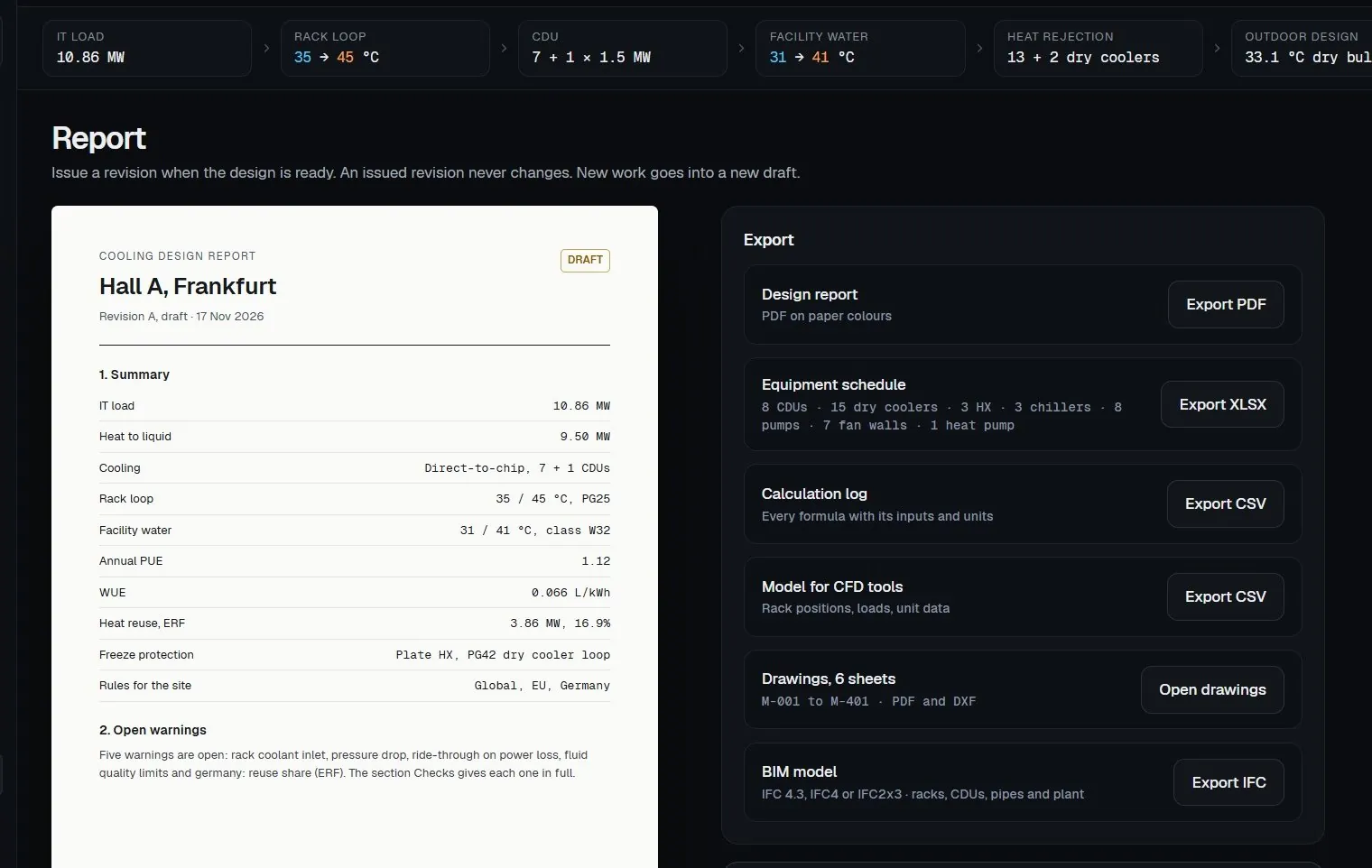
Report
The design report: the summary, the basis, the loop, the plant, the checks and the appendices.
Drawings and model
Schematic, hall layout, piping and the plant yard, on your CAD layer standard, and the BIM model.
Commissioning
The test plan from the factory tests to the integrated full-load test with load banks. Each level has its signer and each test its pass value.
Revisions and review
Review, approve and issue. An issued revision is signed and locked, and new work goes into a new draft.
Files and photos
Datasheets, site photos and vendor files, kept with the project and linked to the values they prove.
These actions need a person's approval
- Issue a revision
- Make an option the design
- Change a rule
- Apply a change from the AI assistant
- Delete a project or a file
What it calculates, step by step
Each step takes the results of the step before it. When you change one input, every later step calculates again.
-
01
Site and climate
33.1 °C design dry bulb
- Calculates
- The design dry bulb, the design wet bulb and the freeze case from 25 years of NASA POWER hourly data. The PVGIS typical year for the annual model. The free-cooling hours at your dry cooler supply temperature.
- You get
- Design values with their source, an editable margin for grid data, and the free-cooling hours for each degree of supply temperature. You can import your own EPW file.
-
02
IT load
10.86 MW · 9.50 MW to liquid
- Calculates
- The IT load of each rack group (rack type, count, power, liquid share) and the split of the heat into liquid and air, for each build phase.
- You get
- The load per phase. The rack library holds 14 AI platforms, from DGX H100 to Vera Rubin NVL144 CPX and Rubin Ultra NVL576, each value with its source and date.
-
04
Liquid loop
7 + 1 CDUs of 1.5 MW
- Calculates
- For the rack loop and the facility water: the flow, the pipe size of each run, the velocity, the pressure drop per metre, the pressure drop on the worst path and the pump duty. The load on each CDU in normal operation and with one CDU out. Fluid data from CoolProp 8.0.0 at the mean temperature of the loop.
- You get
- The pipe schedule, the pump duty and the CDU count. Other loop types: rear-door heat exchangers, single-phase immersion, two-phase direct-to-chip and liquid-to-air CDUs.
-
05
Heat rejection and the full year
PUE 1.12 · WUE 0.066 L/kWh
- Calculates
- The dry coolers, the adiabatic spray hours, the trim chillers for hot and humid hours and the fan walls, hour by hour for 8,760 hours. The glycol share from the 20-year minimum temperature. The noise at the site boundary at night.
- You get
- PUE for each month and for the year, WUE, water by source (town water, rain water, treated grey water), energy, running cost in your currency, the freeze point, the night noise and a forecast of the EU A to G rating.
-
06
Heat reuse and carbon
ERF 16.9% · 3,857 kW to the network
- Calculates
- A heat pump to a district heating network: its supply temperature, COP, hours and delivered heat. The energy reuse factor (ERF), the carbon usage effectiveness (CUE) and the carbon of the year, with the grid carbon intensity from Ember.
- You get
- The ERF against the site's target for each year, the shortfall in MWh when there is one, and the ways to reach the target.
-
07
Redundancy and power
N+1 met
- Calculates
- Each failure case: one CDU out, two CDUs out, a facility water pump out, two dry coolers out, a heat exchanger out, a glycol pump out, a chiller out, and a grid loss. For each case, the capacity left against the load. The power list of the cooling plant and the UPS fit. The part load of CDUs and chillers in each build phase.
- You get
- A pass or fail for each case, the plant power list, and a warning when a unit runs below its lowest stable load. You can try N+2 on a copy of the design.
-
08
Leaks, fluid and controls
BACnet/IP or Modbus TCP
- Calculates
- The leak zones with their sensors and the action of each zone. The fluid volume and the fill. The margin between the rack loop supply and the dew point of the hall. The ride-through after a power loss: the seconds until the racks reach their limit, against the fan restart time.
- You get
- The leak plan, the fluid volume, the setpoints, the failure scenarios and the BMS points list as CSV or XLSX for the controls contractor.
-
09
Floor plan and structure
kN/m² against the slab
- Calculates
- The positions of the racks and units in the hall, the air temperature at the rack inlet (2D estimate), and the floor load with a CDU full of fluid, against the slab rating.
- You get
- The hall layout and a CSV of rack positions, loads and unit data for a CFD tool.
Try it: change the rack loop ΔT
- Total flow
- 14,228 L/min
- Rack-loop pumps
- 55.8 kW
- Return to the CDUs
- 45 °C
Hall A, 9.50 MW to liquid, PG25, 50 mm rack hoses. Values from the liquid loop step of the app.
The draft hall in 3D
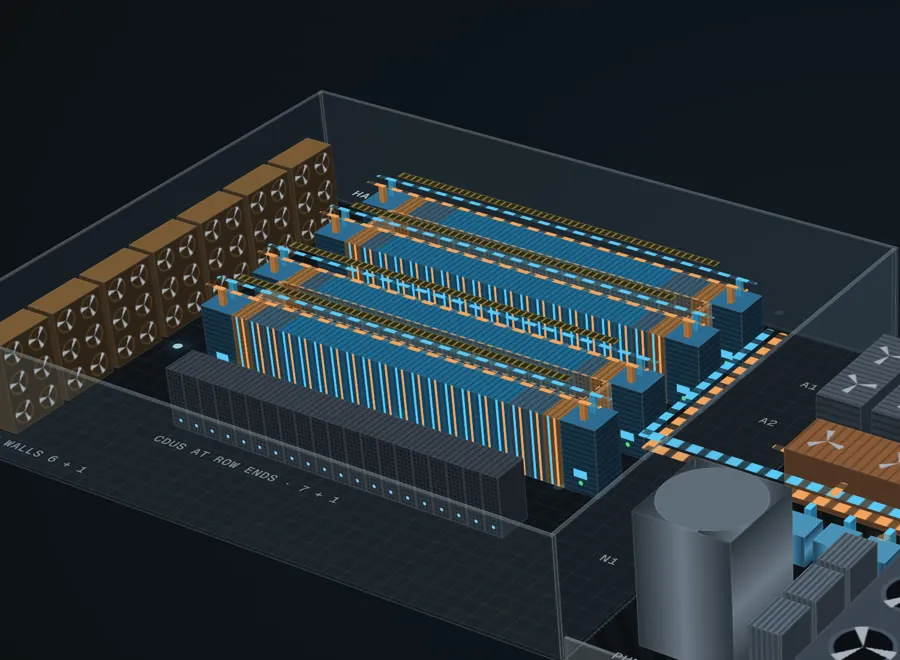
The app draws the hall in 3D from the design while it is still a draft. When you change the racks, the CDUs, the pipes or the yard, the 3D model changes at once. The hall at the top of this page uses the same geometry.
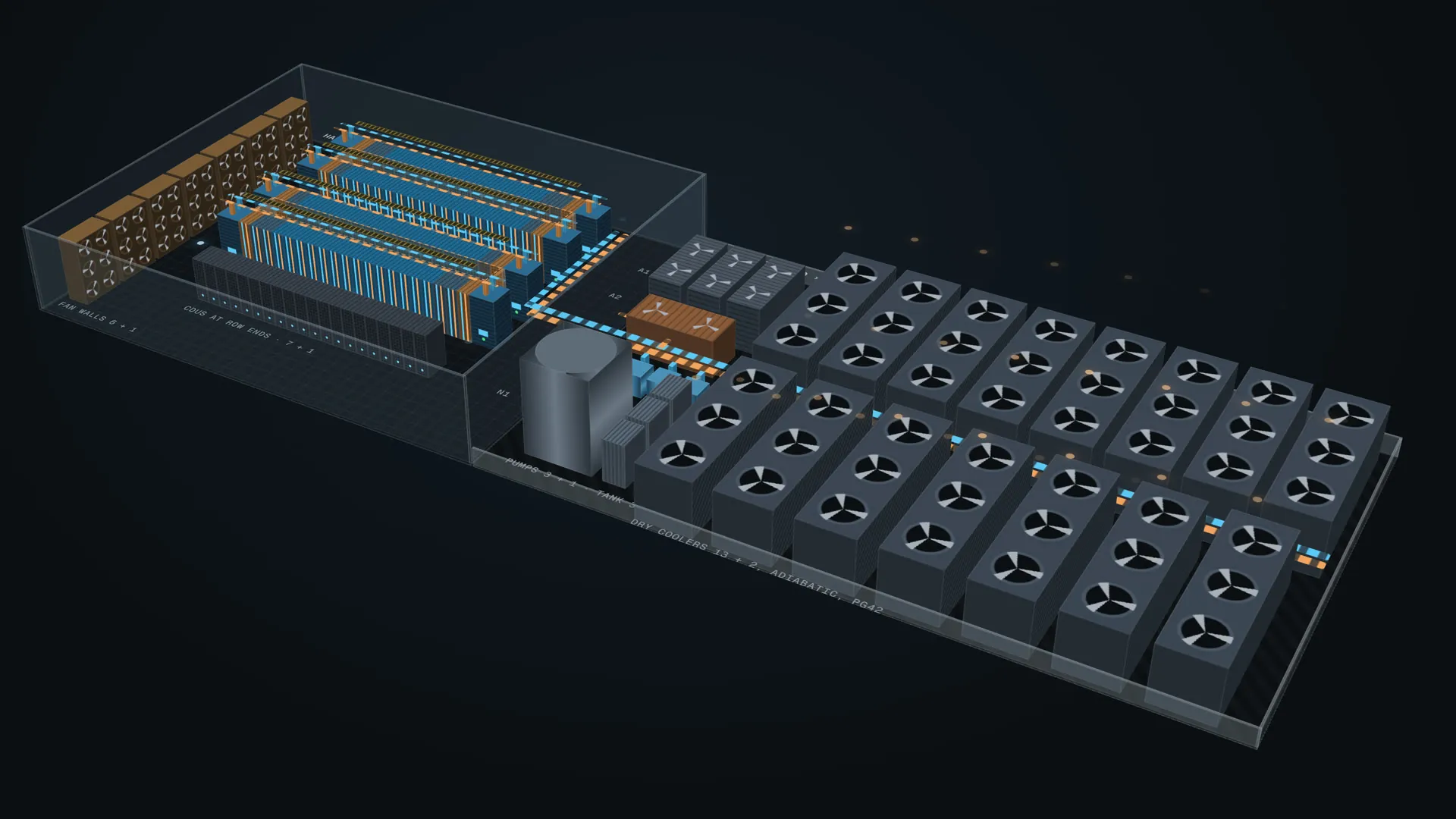
Build tour
The hall builds step by step: the racks, the CDUs, the pipes, the plant and the yard. Each step has a close-up and a short caption.
Coolant flow
The rack loop and the facility water move in the pipes: cyan for supply, amber for return.
Layers
Turn each layer on or off: GPU racks, network row, pipes and flow, air flow and dry cooler exhaust, walls and fence, hot aisle roofs, floor labels, and rack inlet temperature colours.
Click a unit
A CDU shows its load now, its load with one CDU out, and the racks it serves. A dry cooler shows adiabatic or dry mode. The heat pump shows the heat taken and delivered.
Views
Corner, top, low and yard, a plan view, full screen, or a window of its own on a second screen.
Presentation video
Export the tour as an MP4 file for the client meeting.
Every rule, checked after each change
The location of the site selects the rule sets: global, then the EU, then the country. Each check shows the value, the limit, the status and the source of the rule. A rule that the app cannot check shows as a note, never as a pass.
Hall A: 16 pass, 5 warnings, 3 notes, 0 fail
Project limits16
- Rack coolant inletRack loop supply against the rack vendor's limitWarning
- Pipe velocityFastest pipe against your limit in m/sPass
- Pressure dropWorst run in Pa/m against your limit, with the pipe size that passesWarning
- CDU redundancySpare CDUs against your N+ targetPass
- Dry cooler marginMargin with the standby units out, pump heat includedPass
- Freeze protectionFreeze point of the glycol against the 20-year minimumPass
- Supply in hot, humid hoursHours a year when the rack loop supply risesPass
- Condensation marginRack loop supply against the dew point of the hallPass
- Ride-through on power lossSeconds to the rack limit against the fan restart timeWarning
- Fluid quality limitsLimits from the rack vendor's sheetWarning
- Part load in each phaseCDU and chiller load against the lowest stable loadPass
- UPS for cooling loadsPumps, fan walls and controls against the UPS sizePass
- Floor loadHighest kN/m² against the slab ratingPass
- Boundary noise at nightdB(A) at the boundary against the local limitPass
- Weather data licenceOnly weather data with a named, free licencePass
- Heat pump in each phaseHeat output in each build phase, for the heat customerNote
Global2
- ASHRAE liquid classFacility water supply against the classes W17 to W45Pass
- Air to the racksRack inlet air against the A1 range 18 to 27 °CPass
European Union4
- Waste heat dutyAbove 1 MW, use the waste heat. EED 2023/1791, Article 26(6)Pass
- F-gas: chiller refrigerantGWP below 750 from 2027. Regulation 2024/573, Annex IVPass
- KPI reportingApplies at 500 kW or more. Delegated Regulation 2024/1364Note
- Rating forecastA to G scale, adopted, not in forceNote
Germany2
- PUE of a new site1.2 or lower. Energy Efficiency Act (EnEfG)Pass
- Reuse share (ERF)10% from July 2026, 15% from 2027, 20% from 2028. EnEfGWarning
The rule library
32 rules in 14 rule sets: global, the EU (all 27 countries), Germany, France, the Netherlands, Ireland, the United Kingdom, Singapore, the United States, Japan, China, India, the United Arab Emirates and Australia.
Each rule shows its state, for example "Checked" against the primary source, "Adopted, not in force", "Bill", "Consultation" or "Not transposed". A rule change needs the approval of a reviewer.
Live calculations run for the global, EU and German rules. For the other markets, the app lists each rule and its state. The project limits apply to every site.
The files you issue, and who uses them
All files come from the same model, so the report, the schedule, the drawings and the BIM model show the same numbers.
| File | Format | What is in it | For |
|---|---|---|---|
| Design report | Summary and design basis, the liquid loop and heat rejection, heat reuse and carbon, freeze protection, water and noise, redundancy and controls, build phases and structural loads, options and cost over 10 years, the checks, and three appendices: the calculation log, the linked datasheets and the commissioning plan. In English, German, French, Spanish, Dutch or Japanese. | Client, authority, reviewer | |
| Equipment schedule | XLSX | Each unit with its duty and data. Hall A: 8 CDUs, 15 dry coolers, 3 heat exchangers, 3 chillers, 8 pumps, 7 fan walls, 1 heat pump. | Procurement, contractor |
| Calculation log | CSV | Every formula with its inputs and units. | Checking engineer |
| Drawings | PDF, DXF | 6 sheets: M-001 cooling schematic, M-101 hall layout, M-201 rack loop piping, M-202 facility water piping, M-301 roof plan, M-401 equipment schedule. DXF on your CAD layer standard. | CAD team |
| BIM model | IFC 4.3, IFC4, IFC2x3 | Racks, CDUs, pipes and plant. | BIM coordinator |
| BMS points list | CSV, XLSX | The point count for each unit type, the leak zones with their sensors, and the protocol: BACnet/IP or Modbus TCP. | Controls contractor |
| CFD layout | CSV | Rack positions, loads and unit data. | CFD specialist |
| Commissioning test sheets | Levels L1 to L5, from the factory tests to the integrated full-load test, with the pass value and the signer of each test. | Commissioning agent | |
| Check list | CSV | Each check with its value, limit, status and source. | Reviewer |
| 3D tour | MP4 | The build of the hall, step by step. | Client meeting |
Why you can trust a value
Real fluid data
CoolProp 8.0.0 gives the density, heat capacity and viscosity at the mean temperature of each loop, not at a fixed 20 °C.
The full year
The energy model runs all 8,760 hours of the PVGIS typical year. The design values come from 25 years of NASA POWER hourly data.
A source on every value
Each value names its source: vendor datasheet, press report, secondary source or sample value. A sample value says so on screen and in the report.
Proven against a reference
For the sample hall, the app gives the same result as an independent reference calculation on all 244 values on its screens.
Full precision inside
The engine keeps SI units at full precision and rounds only on screen, so a rounded number never enters a later step.
Values linked to their proof
Attach a datasheet to the project and link a value to the page that proves it.
From draft to an issued revision
- 1
Draft
Each change saves at once, with undo and redo, also after a restart. Each version shows the changes since the last revision.
- 2
Review
The reviewer comments on a version. Send the project for review as a file with a passphrase, so only the reviewer can open it.
- 3
Approve
The reviewer approves with an Ed25519 signature. Any PC can verify the signature.
- 4
Issue
Only an approved version can be issued. An issued revision is locked, and new work goes into a new draft.
Teams without a server
The owner exports a signed organisation file with the people, the roles and the defaults. Colleagues import it and see the fingerprint of the owner's key.
Your data stays on your PC
No server and no account
The organisation, the projects and the libraries are in a database on your PC.
Encrypted on disk
The database uses SQLCipher with a 256-bit key. The operating system's keychain holds the key.
What goes over the network
The weather download (PVGIS and NASA POWER), the grid carbon data, an update when you agree to it, and the AI provider if you turn it on. No tracking and no crash reports.
A record of every change
Each change goes into a change log with the change and its reverse. A daily backup keeps the last 14 days.
An optional AI assistant
It works on a copy of the design and shows each step. You apply or discard its change. Use a cloud provider, or a local model in Ollama or LM Studio so no project data leaves the PC. Limits for runs, tokens and cost, and an audit log.
A Trust page in the app
It lists each security and governance control with its test and its date. Export it as a PDF for your client.
See it on your own hall
Send us the site and the rack list. In the demo we run your project through all 16 steps and the full year, and you keep the report.
Request a demo- Your site's weather year
- Your rack list and phases
- The rules of your country
- Your design report